Aim: Configuration of Proxy Server.
Government college of engineering Yavatamal

Greetings, I'm Ashwin Santosh Telmore, a passionate tech enthusiast on a mission to demystify the intricate world of technology. With a background in Computer Engineering and a flair for simplifying the complex, I'm here to share tech knowledge in the easiest and most accessible way.
Imagine having your own personal tech guide – that's where I come in! From exploring the wonders of the MERN stack to unraveling the magic behind web development, I'm here to make tech concepts like C++, JavaScript, and Python a walk in the park.
Navigating the dynamic realm of web technologies, I've mastered HTML, CSS (SASS), and JavaScript, empowering me to bring websites to life with interactivity. Let's embark on a journey through the ever-evolving tech landscape, making the intricate world of technology understandable for all.
Aim: Configuration of Proxy Server.
To check the current version of Ubuntu type the below command
lsb_release -a
update and install squid
sudo apt update
sudo apt-get install squid
edit configuration file
sudo vim /etc/squid/squid.conf
Search http_access and paste the code following code there
#Second try test ashwin
acl localhost scr your_ip_address
acl blocksite dstdomain "/etc/squid/blocksite
http_access deny blocksite
http_access allow localnet

#this ashwin comment : add finally deny all other access to this proxy
http_access allow all
add the site to be blocked by tying this command anding the site URL inside the file
sudo vim /etc/squid/blocksite
restart squid
systemctl restart squid
Done! 🙂
Test proxy on firefox
go to firefox settings and search for proxy
add the below details there
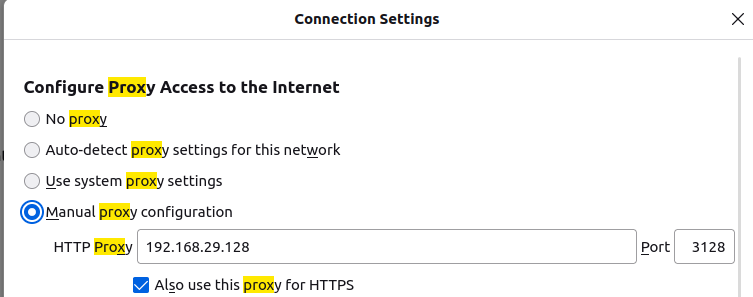
and press ok
Now facebook.com is no longer accessible

Done! 🙂
please login and hit the like button for my motivation😥


