Program on the concept of array and operations on array in JavaScript.

Greetings, I'm Ashwin Santosh Telmore, a passionate tech enthusiast on a mission to demystify the intricate world of technology. With a background in Computer Engineering and a flair for simplifying the complex, I'm here to share tech knowledge in the easiest and most accessible way.
Imagine having your own personal tech guide – that's where I come in! From exploring the wonders of the MERN stack to unraveling the magic behind web development, I'm here to make tech concepts like C++, JavaScript, and Python a walk in the park.
Navigating the dynamic realm of web technologies, I've mastered HTML, CSS (SASS), and JavaScript, empowering me to bring websites to life with interactivity. Let's embark on a journey through the ever-evolving tech landscape, making the intricate world of technology understandable for all.
Aim: Program on the concept of array and operations on array.
Requirements:
- Working PC or Laptop ,
- Installed any operating system
- Any browser (Google Chrome)
- Any code Editor(VS Code)
Theory:
In JavaScript, array is a single variable that is used to store different elements. It is often used when we want to store list of elements and access them by a single variable. Unlike most languages where array is a reference to the multiple variables, in JavaScript array is a single variable that stores multiple elements.
Declaration of an Array There are basically two ways to declare an array. Example:
var House = [ ]; // method 1
var House = new Array(); // method 2
Push function Definition and Usage The push() method adds new items to the end of an array.
The push() method changes the length of the array.
The push() method returns the new length.
Examples Add a new item to an array:
const fruits = ["1", "2", "3", "4"];
fruits.push("5");
Pop function Definition and Usage The pop() method removes (pops) the last element of an array.
The pop() method changes the original array.
The pop() method returns the removed element.
Examples Remove (pop) the last element:
const fruits = ["1", "2", "3", "4"];
fruits.pop();
Unshift function Definition and Usage The unshift() method adds new elements to the beginning of an array.
The unshift() method overwrites the original array.
Examples Shift (remove) the first element of the array:
const fruits = ["Banana", "Orange", "Apple", "Mango"];
fruits.shift();
Shift function Definition and Usage The shift() method removes the first item of an array.
The shift() method changes the original array.
The shift() method returns the shifted element.
Examples Shift (remove) the first element of the array:
const fruits = ["Banana", "Orange", "Apple", "Mango"];
fruits.shift();
Concat function Definition and Usage The concat() method concatenates (joins) two or more arrays.
The concat() method returns a new array, containing the joined arrays.
The concat() method does not change the existing arrays.
Examples Join two arrays:
const arr1 = ["Cecilie", "Lone"];
const arr2 = ["Emil", "Tobias", "Linus"];
const children = arr1.concat(arr2);
slice function Definition and Usage The slice() method returns selected elements in an array, as a new array.
The slice() method selects from a given start, up to a (not inclusive) given end.
The slice() method does not change the original array.
Examples Select elements:
const fruits = ["Banana", "Orange", "Lemon", "Apple", "Mango"];
const citrus = fruits.slice(1, 3);
Splice Definition and Usage The splice() method adds and/or removes array elements.
The splice() method overwrites the original array.
Examples At position 2, add 2 elements:
const fruits = ["Banana", "Orange", "Apple", "Mango"];
fruits.splice(2, 0, "Lemon", "Kiwi");
Filter function Definition and Usage The filter() method creates a new array filled with elements that pass a test provided by a function.
The filter() method does not execute the function for empty elements. The filter() method does not change the original array.
Example 1 Return an array of all values in ages[] that are 18 or over:
const ages = [32, 33, 16, 40];
const result = ages.filter(checkAdult);

function checkAdult(age) {
  return age >= 18;
}
Program code
var a = [1,2,3];
console.log('a :>> ', a);
console.log("push operations ")
a.push(4);
console.log('a :>> ', a);
a.push(5);
console.log('a :>> ', a);

console.log("pop operations ")
 console.log('a.pop() :>> ', a.pop());
 console.log('a.pop() :>> ', a.pop());
console.log('a :>> ', a);

console.log("shift operations ")
 console.log('a.shift() :>> ', a.shift());
console.log('a.shift() :>> ', a.shift());
console.log('a :>> ', a);


console.log("unshift operations ")
console.log('a.unshift(1) :>> ');
console.log('a.unshift(2) :>> ');
a.unshift(1);
a.unshift(2);
console.log('a :>> ', a);
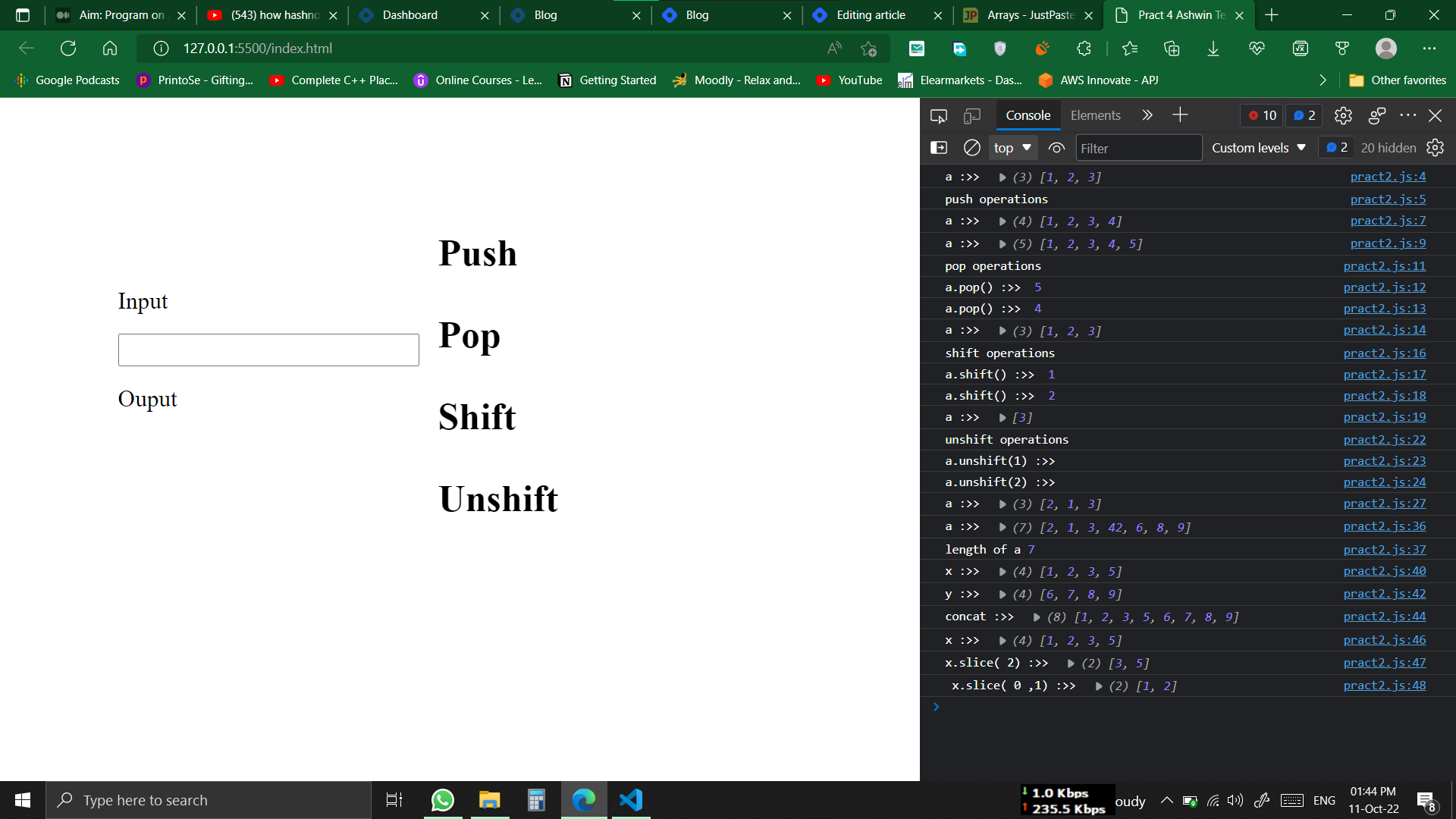
Output: